Did you misplace your AirPods case and start to panic? Don’t worry, you’re not alone, and there are ways to get it back. Here we’ll walk you through all the proven methods on how to find your AirPod case step-by-step.
Let’s jump into everything you need to know to track down your missing AirPods case with or without the AirPods inside.
Quick Answer:
For AirPods case tracking: head to the Find My app > Devices > Your AirPods > Play Sound > Find.
How to Find your Airpod Case in All the Scenarios?
Here are the different methods to look for your lost AirPods case. So, go through the section below and use it anyway according to your situation:
Here are the different methods to look for your lost AirPods case. So, go through the section below and use it anyway according to your situation:
1: How to Find your Airpod Case using Find My App
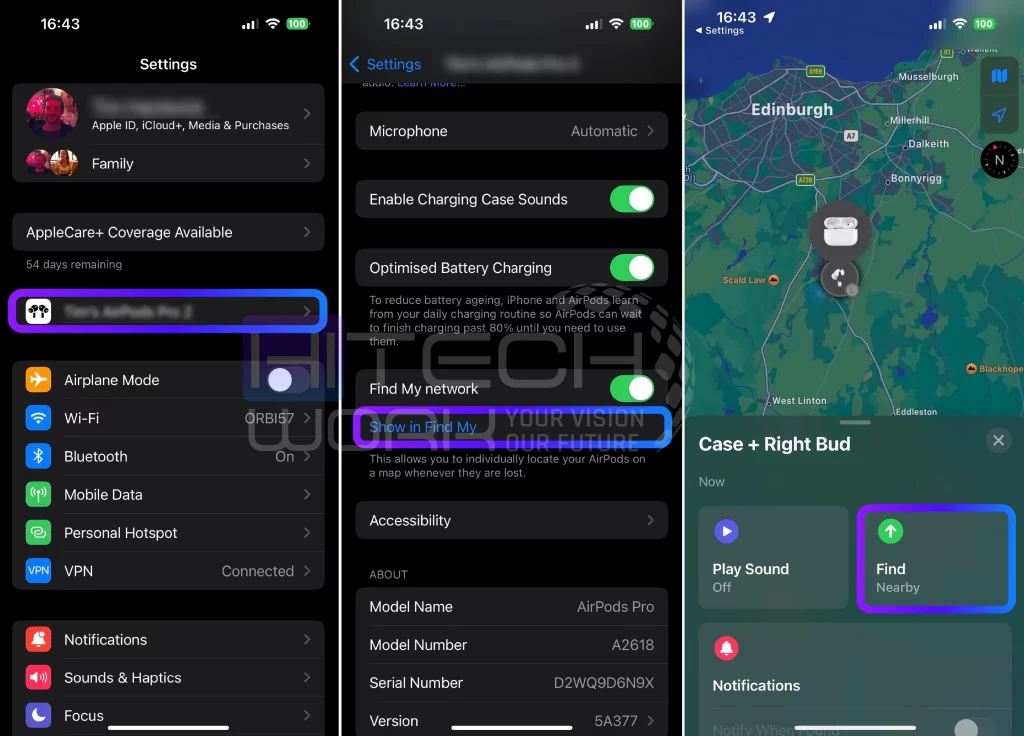
You can find Airpod case location in the “Find My” app on your Apple devices, and also add your AirPods device to the Find My App. This app comes preinstalled on most iOS devices that use iOS 13 or above. Find My App shows the last location of the case if your AirPods were inside and the case is charged. So, let’s see the step-by-step guide to looking for the AirPods case through the Find My app:
- Firstly, open the Find My app on your iOS Device.
- Then, choose your AirPods under the Devices tab.
- If your AirPods case is open, you may play a sound that will generate an audible signal that helps you locate them.
- Tap on the play sound option, now your airpod case will beep.
- Now follow the sound and find your case within the Bluetooth range.
2: How to Find your Airpod Case without Pods
To look for an AirPods case, you might need some luck here. It is easy to find AirPod case if both earbuds are inside the case. But you can still locate the case’s last location with the help of Apple’s iCloud if you want to recover the case only. Hence, see the tracking method to find AirPods case without AirPods:
- Open the Find My app on your phone.
- Now, select your AirPods from the list of your paired devices.
- It means it is nearby if it is showing a green light along with the AirPods name. Or if it is showing grey light, it means it is out of range, unfortunately. Nevertheless, you can still track their last location.
- Go to the previous position by clicking the car, walking, or other button.
- You need to find the location precisely because you have only the case, not the AirPods inside.
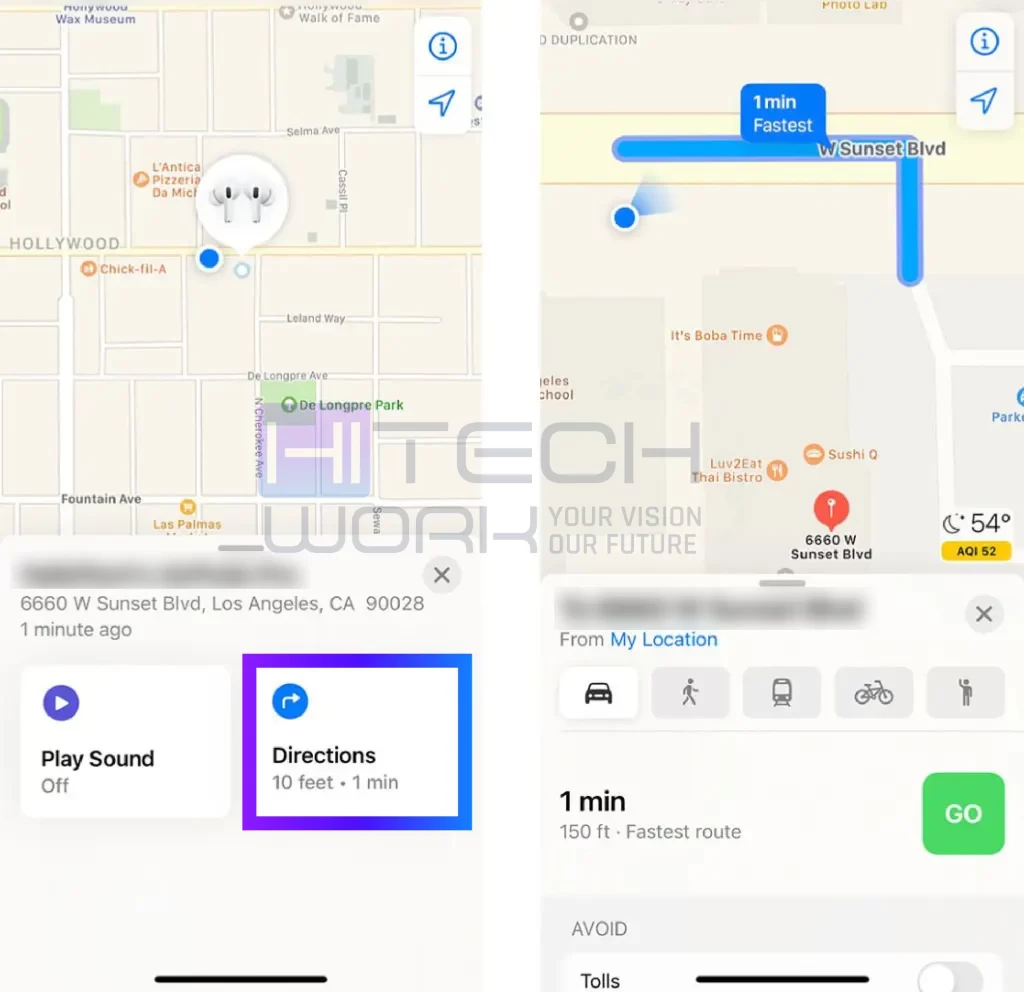
NOTE: All the steps mentioned above are also applicable if your AirPods case is dead. You may use Precision Finding if you are within close range of Airpods. Also, these steps are only applicable to AirPods 3 Generation, AirPods 4 Generation, AirPods Pro, or AirPods Max and have an iPhone 11 or newer.
3: How to Find your AirPod Case through the Lost Mode Feature
The Lost Mode feature was launched with iOS 15. This feature lets you mark your AirPods as lost, so when you turn on the lost mode feature, it will notify you when your AirPods case comes online.
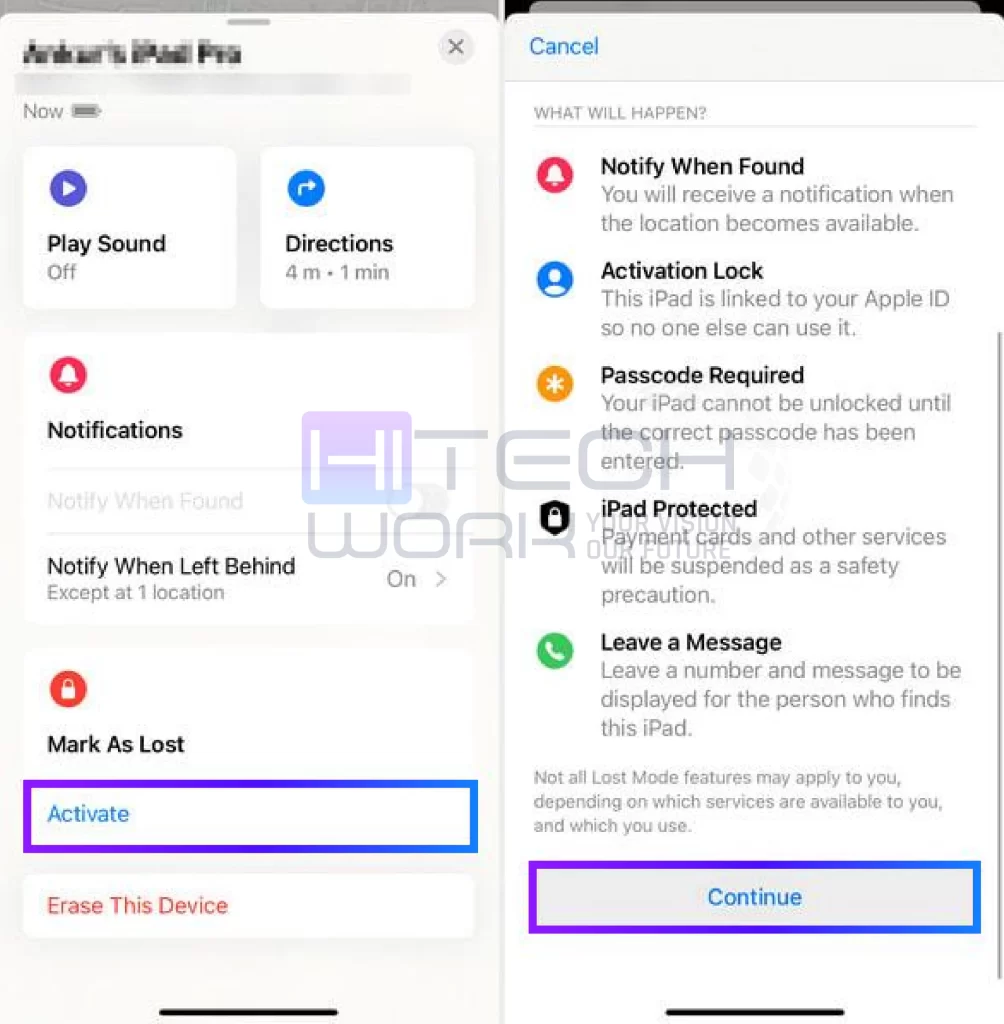
- Launch the Find My app and click on the Device.
- Then, select your AirPods that are missing from the Airpod case.
- Under the tab of Mark As Lost, click on Activate.
- Now, click on the Continue.
- As an optional, you can add a phone number or email for the AirPods case finder to contact you.
- After that, click on the Activate tab to fully activate the Lost Mode.
Note: Remember, the emphasis here is on the Airpods, not the AirPod case, but you can also find Airpod case with the above tricks due to the AirPods.
4: How to Find your Airpod Case Using Notify When Left Behind
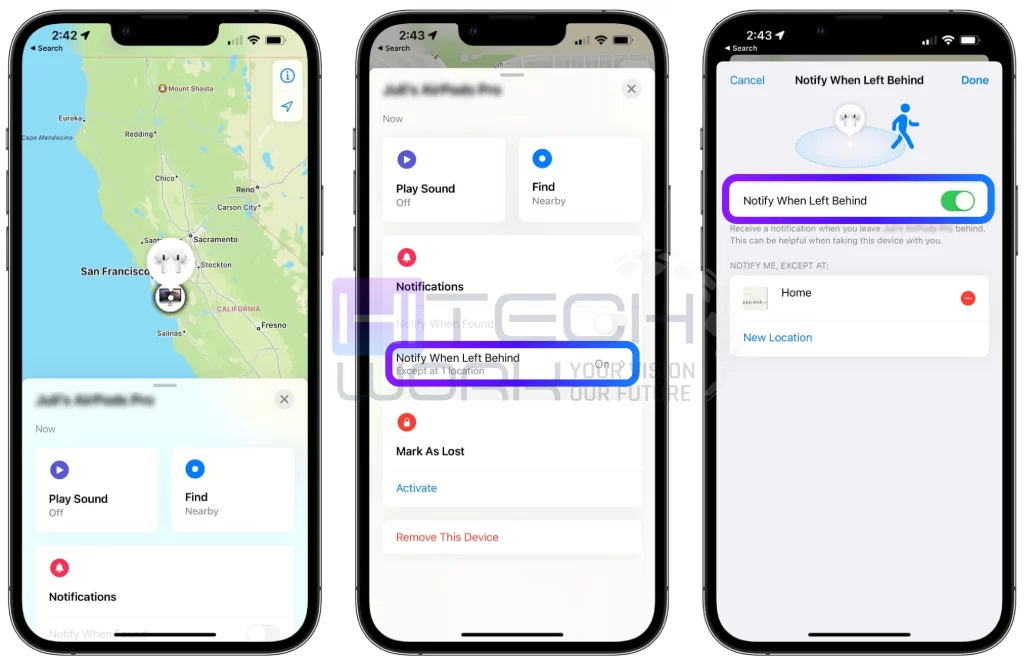
Apple has introduced a Notify When Left Behind feature in the Find My app for AirPods Pro (1st generation and later), AirPods Max, and AirPods (3rd generation). It sends a notification to your iPhone if your AirPods get disconnected and are left behind at a different location. Here is how you can turn on the Notify When Left Behind feature and use it.
- Open the Find My app on your phone.
- Select your Airpods and turn on the Notify when left behind feature.
- If you leave your case at a public spot, you’ll get a notification to help you get your Airpods back.
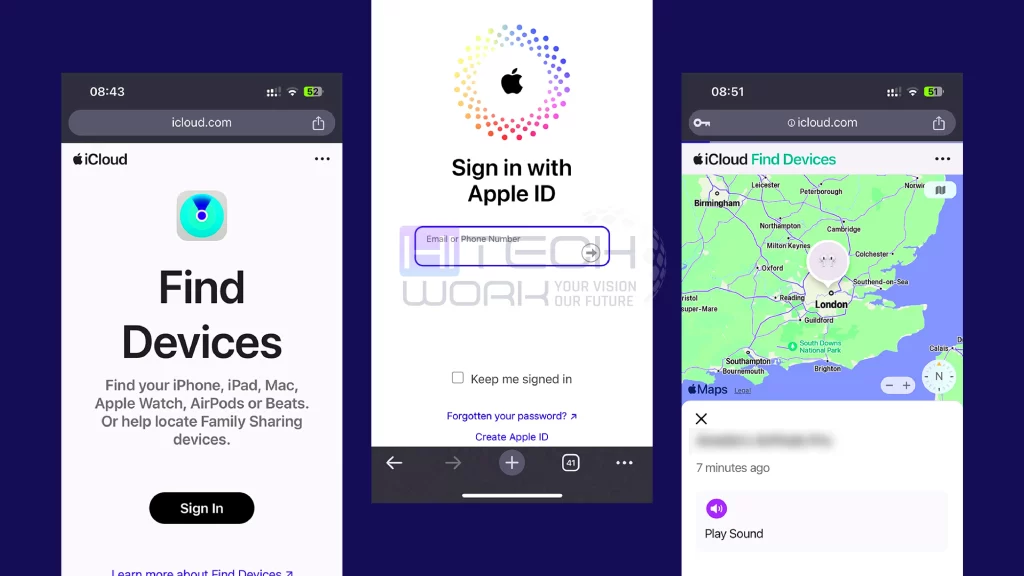
5: How to Find Airpods Case Via iCloud
What if you have lost your iPhone and Apple headphone case as well? In such a situation, you have only one option: use a computer and find your AirPods using the iCloud app. So, follow the steps below:
- First, head to https://www.icloud.com/find/.
- Enter your Apple ID and log in to your account. Select anyone connected to AirPods if you have multiple IDs.
- Now insert the Apple password.
- Tap on the All devices tab, and then click on your AirPods.
- Now, you can find the device’s last location under each device, and it will show Offline.
How to Find AirPod Case not showing in Find My?
You may be disappointed to hear that you cannot find the AirPods if they disappear from the Find My iPhone app. It shows that your AirPods case is out of range. Therefore, connecting through Bluetooth is not possible.
Still, the app will show you the last location where your AirPods were last connected. Again, it will not show you the exact location and will only give you an idea of the spot where you lost them. So, try your luck and find them manually if you’ve lost them at home.
What to Do If You Can’t Find Your Case
If you have tried all of the above-mentioned methods but still can’t find Airpod case. In this situation, the best option is the AirPods case replacement. To do that, visit an Apple Store or order online; however, make sure it matches your AirPods model. Once you have it, pair the new case by placing your AirPods inside and pressing the setup button.
Hack: If you have an AppleCare+ subscription, you might get a discounted Airpods replacement, but it would not help track a lost case.
Use Preventive Accessories For Your AirPods to Avoid Losing Them
As you know, prevention is better than a cure. Here are some practical accessories to keep your AirPods within your limit to save you from this issue. Hence, let’s go through a few of the accessories’ lists:
- Anti-lost straps
- AirTag cover
- Tile trackers
5 Tips for Preventing Loss of Your AirPod Case
- Keep your AirPods case in the same place to reduce the chance of losing it.
- Attach a Bluetooth tracker like a Tile or Apple AirTag to quickly locate it using your phone.
- Keep the case in a secure pocket to prevent accidental loss when you are not using it.
- Enable the Notify When Left Behind feature (if your AirPods model supports it).
- Make sure your AirPods case is charged so you can use the Find My feature if needed.
FAQs
Can you find a lost AirPods case?
Yes, you can find AirPod case using the Find My app if the case has AirPods inside and is charged. The app will show you the live location. However, if the case is empty or dead, you’ll only see the last known location.
How to find Airpod case on Android?
To find AirPod case on an Android phone:
- Install a Bluetooth Finder App like “Find My Bluetooth Device.”
- Scan for your AirPods case to detect nearby Bluetooth signals.
- Use Signal Strength to move closer.
Keep in mind, these steps will only work when the case has a battery and AirPods inside.
Can I Find the Lost Airpods Case with Serial Number?
No, you can’t track a lost AirPods case using the serial number. Even with AppleCare, it won’t help locate it. Your only option is to contact Apple for an AirPods case replacement, which comes with a fee.
How to find lost Airpods that are offline and dead?
To find lost, offline, and dead AirPods,
- Go to Find My app to view the last known location on a map.
- If they come back online, you will get a notification.
NOTE: If your AirPods are dead, they can’t play a sound.
How make your Airpod case beep?
- Go to Settings on your iOS device.
- Tap on your AirPods.
- Turn on or off the Enable Charging Case Sounds option.
Do AirPods have GPS?
AirPods do not have built-in GPS, but they can be tracked by using the GPS from your paired iPhone or Apple device.
Why does my AirPods case chime?
If your AirPods case is chiming or beeping, it means it’s in Lost Mode or being pinged through the Find My app to help locate it.
Final Thoughts
Missing your AirPods or the AirPod case is a terrifying experience. However, you can recover them quickly, but make sure to be careful with them.
Hopefully, now you will know all the methods on how to find your AirPod case if you lost it, and also some valuable tips that will reduce the chances of losing them. Hence, if anything is missing or you want to share your lost and found story, you can share it by commenting.