When you’re in the middle of an intense game, and suddenly your controls stop behaving normally. You press W expecting to move forward, but the arrow keys respond instead. Frustrating, right? If you’re facing the issue where WASD and arrow keys swapped, don’t worry, you’re not alone. This is a common keyboard problem faced by many gamers.
In this guide, we’ll explain why WASD and arrow keys swapped, what causes it, and how you can fix it step by step, without being a tech expert.
What Does WASD and Arrow Keys Swapped Mean?
When WASD and arrow keys swapped, it means your keyboard inputs are reversed.
- Pressing W, A, S, D moves the cursor like the arrow keys
- Pressing the arrow keys acts like WASD controls
This issue usually appears during gaming or after accidentally pressing certain key combinations.
Reasons and Fixes for WASD and Arrow Keys Swapped
QUICK FIX: Unplug your keyboard and plug it back in a different port. Now check the keys if they are working accurately or not.
1. Use the FN Key Shortcut
Sometimes you may accidently active alternate function mode that causes WASD and Arrow Keys swapped. So, to set it back ter any of the following key combinations:
- Fn + W
- Fn + Esc
- Fn + Arrow Keys
- Fn + O
- Fn + Win
- Fn + Q
2. Check the Keyboard Layout
If you set the wrong keyboard language or layout, it can cause WASD and arrow keys to be swapped. So check your keyboard settings and make sure you are using the correct keyboard layout. To check it out, follow these steps.
- Head to the settings and click on the time language.
- Make sure the US QWERTY language/layout is selected.

3. Update Keyboard Drivers
Driver issues can silently cause WASD and arrow keys swapped.
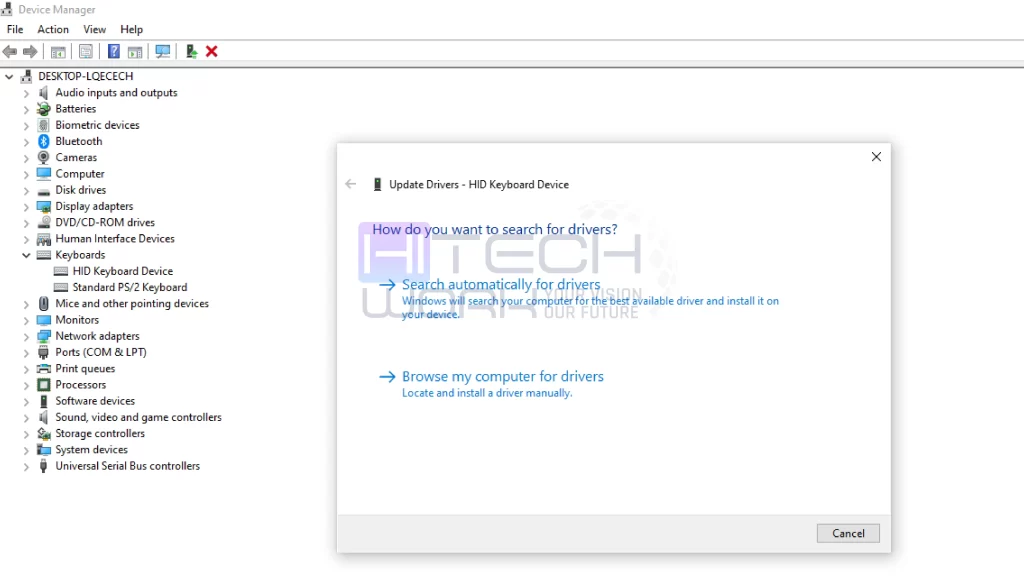
- Head to the device manager from the Windows Start button.
- Expand the Keyboards menu and right-click on your keyboard driver.
- Click on the Update driver option.
- Now, click Search automatically for drivers’ option from the pop-up window.
- Follow the on-screen prompts to check if an update is available.
4. Reinstall Keyboard Drivers
If you still continue to experience the WASD and Arrow Keys Swapped issue, then try uninstalling and reinstalling your keyboard drivers to do that:
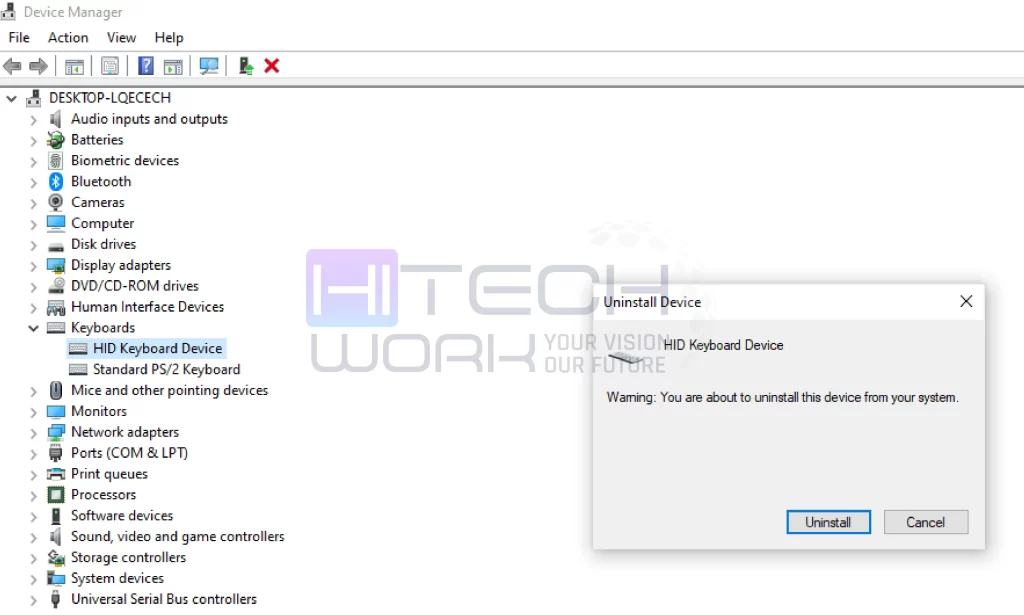
- Head to the device manager from the Windows Start button.
- Expand the Keyboards menu and right-click on your keyboard driver.
- Click on the uninstall driver option.
- Then click uninstall and follow the on-screen prompts to reinstall the driver.
5. ReMap Keys in Game
If none of the above fixes work for WASD and Arrow Keys Swapped, then you have to remap the keys manually. Gaming keyboards have software that lets you remap keys. However, if you don’t have any software on your keyboard, you can download third-party apps that do that.
6. Check Gaming Keyboard Software
When you enabled gaming profiles on your keyboard, you accidentally switched to one where the WASD keys function as directional (arrow) keys. So if your keyboard supports multiple gaming profiles, switch between them and make sure you are using the correct profile without any key remapping enabled. To do that:
- Open the gaming keyboard software you have.
- Search for the key remapping software.
- Here, disable the profiles and reset to the default settings.
Stop WASD and Arrow Keys Swapped From Happening Again
You should avoid pressing random Fn key combinations, disable unnecessary keyboard software, keep keyboard drivers updated, and check if your keyboard has switched to a different profile. With these precautions, you prevent WASD and arrow keys from being swapped again.
FAQs
Why are my WASD and arrow keys swapped?
This usually happens due to an accidental shortcut key, game mode activation, keyboard driver, or third-party key-mapping software.
How to use WASD properly?
To use WASD properly, place your left hand with your middle finger on W (forward), ring finger on A (left), index finger on D (right), and your pinky on Shift or Ctrl for sprinting or crouching. Use your thumb for the Spacebar (jump) and nearby keys like E or F for interaction, which will allow quick access to common actions and smooth movement.
Why do gamers use WASD instead of arrows keys?
Mostly gamers use WASD instead of the arrow keys because it offers better control and fast access to actions like sprinting, jumping, reloading, and interacting. Also, gamers hand rests in a more comfortable, natural position for long gaming sessions.
Is WASD and the arrow keys swapped a hardware problem?
No, in most cases it’s a software or settings issue, not a damaged keyboard.