Technology has changed the way we live, travel, and even drive. One of the most popular innovations in modern vehicles is Apple CarPlay. If you’re wondering what is Apple CarPlay and how it can make driving easier, you’re in the right place.
CarPlay is Apple’s smart solution that allows iPhone users to safely access apps, navigation, calls, and music while keeping their focus on the road. This article will explain in detail what CarPlay is, how Apple CarPlay works, its features, benefits, compatibility, and why it has become a must-have for drivers today.
What is CarPlay?
Before we dive deeper into Apple CarPlay, it’s important to understand the concept of CarPlay itself. CarPlay is essentially a system designed to connect your smartphone to your car’s infotainment screen. Instead of being distracted by your phone, CarPlay allows you to access key functions like navigation, calls, and media directly on the car’s built-in display. It acts as a bridge between your phone and car, giving you convenience and safety at the same time.
What is Apple CarPlay?
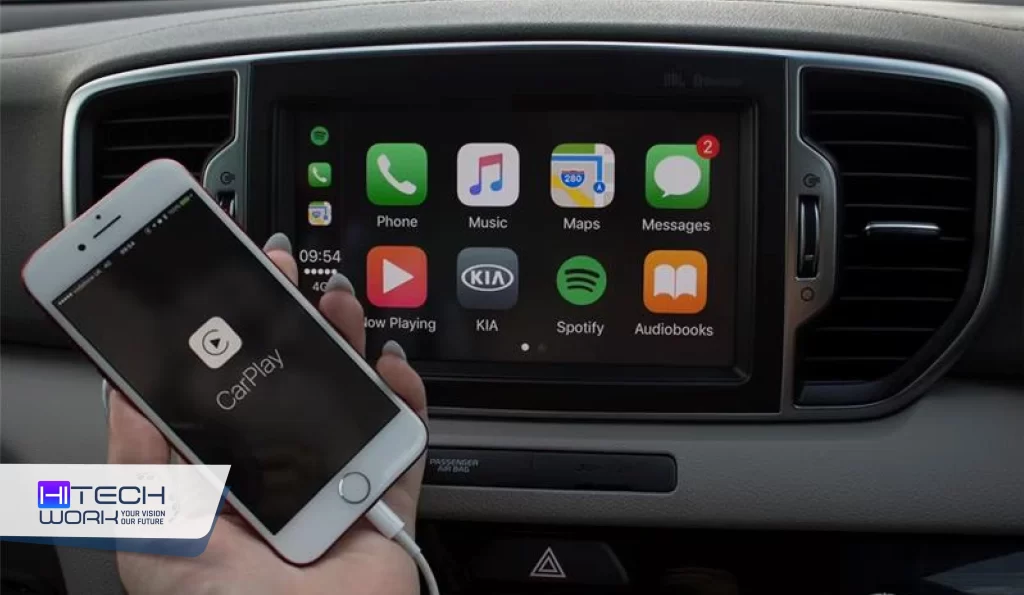
So, what is Apple CarPlay exactly? Apple CarPlay is a feature developed by Apple that integrates your iPhone with your car’s dashboard system. It lets you use iPhone apps directly from your car’s touchscreen, steering wheel controls, or even through Siri voice commands. Apple CarPlay ensures you don’t need to pick up your phone while driving; everything important is within reach more safely.
Launched in 2014, Apple Car Play has now become standard in most modern cars and is available in over 600 vehicle models worldwide. Whether you’re using Apple Maps to find the fastest route, streaming your favorite songs, or replying to messages hands-free, iOS CarPlay makes driving smarter and more connected.
Key Features of Apple CarPlay
Apple CarPlay is packed with features designed to keep drivers safe while still connected to their digital lives. Here are some of the highlights:
- Navigation
With Apple Maps, you can get real-time directions, traffic updates, and estimated arrival times. You can even use third-party apps like Google Maps through Apple Car Play.
2. Hands-Free Communication
Apple CarPlay allows you to make and receive calls or send text messages through Siri. Instead of typing, you can speak commands, making communication much safer while driving.
3. Entertainment on the Go
You can play music, podcasts, or audiobooks directly from your iPhone apps like Apple Music, Spotify, or Audible. The media control is simple and optimized for driving.
4. Voice Control with Siri
iOS CarPlay works seamlessly with Siri, Apple’s voice assistant. Just ask Siri, “Hey Siri and ask the directions, play music, or send messages without taking your eyes off the road.
5. Third-Party App Support
Beyond Apple’s own apps, Apple CarPlay supports a range of third-party apps such as WhatsApp, Spotify, Audible, and more, making it versatile for every driver’s needs.
New Apple Carplay Features in iOS 17
The iOS 17 update brought some exciting improvements to Apple Carplay, making driving even smoother and more personalized:
- SharePlay in Carplay: Passengers can now join your music session and add songs directly from their own iPhone.
- Updated Messages App: Easier to read and reply to messages with a cleaner look and simpler menu.
- Smarter Siri: Siri now understands natural language better and responds faster without needing to say “Hey Siri” every time.
- Improved Maps: More detailed 3D visuals and better directions for routes, gas stations, and parking spots.
- Adaptive Interface: The interface now adjusts automatically to fit wider screens in modern cars.
These new iOS 17 features make Apple Carplay more interactive, fun, and safe to use while driving.
How Does Apple CarPlay Work?
Apple CarPlay works by mirroring your iPhone onto the car’s infotainment display. You can connect your iPhone using a USB cable or, in many newer cars, wirelessly. Once connected, the car’s display will show a simplified, driver-friendly interface of your iPhone.
You can control it in three main ways:
- Touchscreen – Tap and swipe as you would on your iPhone.
- Steering Wheel Buttons – Use built-in car buttons to navigate menus.
- Siri Voice Commands – Use your voice for almost everything.
This combination ensures that Apple Car Play adapts to different driving environments and preferences.
Benefits of Using Apple CarPlay
Apple CarPlay isn’t just a luxury; it’s a safety and convenience tool. Here are some benefits:
- Safety First: By keeping your focus on the road, Apple CarPlay reduces the temptation to look at your phone.
- Ease of Use: With simple controls, even new users find iOS CarPlay easy to navigate.
- Time-saving navigation: Real-time traffic updates help you reach your destination faster.
- Entertainment Without Distraction: Listen to your favorite music, podcasts, or audiobooks seamlessly.
- FutureReady: With continuous software updates, Apple CarPlay keeps improving over time.
Drawbacks of Apple Carplay
While Apple Carplay is a great tool for modern drivers, it still has some drawbacks. Here are a few drawbacks you should know:
- Distraction Risk: Using apps or changing music can sometimes take your attention off the road.
- Connectivity Concern: Apple Car play may disconnect or lag, especially in wireless mode.
- Compatibility Issue: Some older cars or iPhones don’t fully support Apple Carplay features.
Which Cars Support Apple CarPlay?
Apple Carplay is available in more than 800 car models worldwide, but not in every version of each brand. Some basic or older models may not have this feature, depending on the car’s system. Below are a few car brands whose selected models come with Apple Car play support:
- Audi
- BMW
- Ferrari
- Kia
- Ford
- Toyota
How to Connect iPhone to Apple Carplay
Connecting your iPhone to Apple Carplay is quick and easy. You can do it with a cable or wirelessly, depending on your car model.
1. Using a USB Cable
- Plug your iPhone into the car’s USB port using the original Lightning cable.
- The Apple Carplay logo will appear on your car’s screen.
- Tap the Carplay icon and your iPhone apps will show up on the display.
2. Using Wireless Carplay
- Make sure your car supports wireless Apple Car play.
- Turn ON Bluetooth and Wi-Fi on your iPhone.
- On your car’s display, open Apple Carplay setup or Phone Connection.
- Choose your iPhone from the list, confirm the pairing code, and you’re connected.
Once connected, you can use Siri voice commands, the touch screen, or steering wheel controls to navigate apps safely.
Wireless Apple CarPlay
Originally, Apple CarPlay required a wired connection via USB. However, many new vehicles now support wireless Apple CarPlay, eliminating the need for cables. This feature makes it even easier for drivers, as iOS CarPlay automatically connects as soon as you start the car. If Apple car play isn’t working, then read this guide on Apple carplay not working and fix the issues.
Is Apple CarPlay Free?
Yes, Apple CarPlay is completely free to use. There’s no subscription fee; you only need a compatible iPhone (iPhone 5 or later) and a vehicle that supports CarPlay. Some premium car models may charge extra for advanced infotainment packages, but the CarPlay feature itself has no separate cost.
FAQs
Q1: What iPhones are compatible with Apple CarPlay?
Ans: All iPhones from iPhone 5 and later models support Apple Car Play.
Q2: Can I use Apple CarPlay without the internet?
Ans: Yes, many features like music from your phone or making calls work offline, but navigation and streaming apps need internet.
Q3: Is Apple CarPlay better than Android Auto?
Ans: Apple Car Play is best for iPhone users, while Android Auto is designed for Android devices. Both offer similar features.
Q4: Can I install Apple CarPlay in an old car?
Ans: Yes, you can install an aftermarket infotainment system from brands like Pioneer or Alpine that supports Apple Car Play.
Q5: Does Apple CarPlay drain battery?
Ans: If you’re using wired Apple CarPlay, your phone charges while connected. Wireless Apple Car Play may use more battery, but it’s manageable with regular charging.
Q.6: How to connect iPhone to Apple Carplay without Wi-Fi?
Ans: You connect your iPhone to Apple Carplay without Wi-Fi using a physical USB cable.
Conclusion
So, what is Apple CarPlay in simple words? It’s Apple’s way of bringing your iPhone experience safely into your car. From navigation to communication and entertainment, Apple CarPlay has become an essential feature for modern drivers. It enhances safety, saves time, and makes your drive more enjoyable.
With more and more cars supporting it, Apple CarPlay is no longer a luxury’s becoming a standard. Whether you’re buying a new car or upgrading your old one, Apple Car Play is definitely worth considering. It ensures you stay connected, entertained, and most importantly, safe on the road.